Free download · Excel
A commercial rent roll template that checks itself.
A free rent roll template for commercial property: one workbook, five sheets, every figure a formula. Enter the units, the leases and a date, and the rent roll follows from them: a line per lease in force and per vacant unit, occupancy by area and by units, free rent beside the total, expirations and WALT. It ships with a sample filled in.
No email, no sign-up, no macros. One .xlsx file, under 100 KB, five sheets. Made for Excel 2010 or later, LibreOffice and Google Sheets (upload it to Drive, then open with Sheets).
Rent roll · as of Aug 15, 2026
- Leased area
- 4,000 of 5,000 sq ft
- Monthly base rent, contract
- $9,250.00
- Average rent per sq ft per year
- $27.75
- Occupancy
- 80.0% by area · 75.0% by units
- Not charged on Aug 15, 2026 (lease B, free rent)
- $4,250.00
- WALT
- 1.69 years by rent · 1.63 by area
All 11 checks pass
Cell B7 of the Rent roll sheet. Leased plus vacant area comes back to the units by two roads, and the roll’s rent to the leases’: that is what makes it a check and not a total.
What it does
A rent roll on any date, from the leases behind it.
Units and leases, kept apart
Each unit names the lease that covers it, so a lease on two suites adds their areas and no unit is ever counted twice.
One date drives the roll
A lease is in force from its start date through its end date, both included. Change the date and the lines, the rent step and the totals follow.
Free rent beside, not inside
The contract rent stays in the total; what is abated or not yet started is totaled apart, as “not charged on the date.”
Expirations and WALT
The expiry schedule by year, WALT by rent and by area, and the five largest leases’ share of the rent.
The format
The rent roll format: columns, in the order a lender reads them
| Who and where | Line, lease, unit(s), tenant, square feet |
|---|---|
| When | Lease start, lease end, rent commencement, next change on |
| Money | Monthly base rent, rent per sq ft per year, annual rent, CAM / recovery estimate, next monthly rent, abatement % and abated through, not charged on the date, deposit held, tenant balance |
| Notes | A note the sheet writes (free rent, rent not started, awaiting an index, letter of credit expired), and your options or notes |
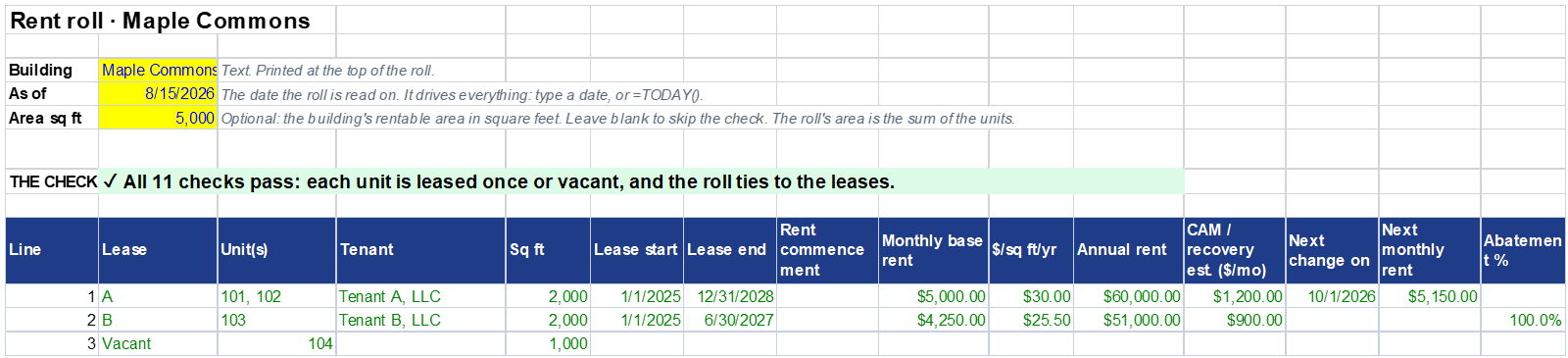
Whether you call it a rent roll format, a form or a spreadsheet, these are its columns, in the order the Rent roll sheet prints them. Under the lines: units and area, occupancy both ways, rent and average rent per square foot, not charged on the date, deposits, balances due and credits apart, and the eleven checks. It is set up to print on Letter, landscape, fit to one page wide, with the column headings on every page.
Rent roll sample
A sample rent roll, filled in
Rent roll sample · Maple Commons · Aug 15, 2026
| Lease | Units | Sq ft | Monthly | Not charged | Deposit held | Balance | Note |
|---|---|---|---|---|---|---|---|
| A | 101, 102 | 2,000 | $5,000.00 | — | $10,000.00 | $1,250.50 | Letter of credit expired. |
| B | 103 | 2,000 | $4,250.00 | $4,250.00 | — | ($300.00) | Abated on the date. |
| Vacant | 104 | 1,000 | Vacant. |
A worked case, not a customer’s rent roll: Maple Commons, four units, 5,000 sq ft, as of August 15, 2026. The rents, areas, deposit, free rent and totals are worked out in what goes on a commercial rent roll; which tenant carries which balance is the workbook’s choice.
Before release, the workbook was evaluated on this sample and on 24 variants (other dates, abatements, a lease ending the day before, deliberate errors), each figure compared to the cent.
How to use it
How to make a rent roll in Excel, in four steps
- 1Units sheet: one row per unit, its area as the lease defines it, and the ID of the lease that covers it.
- 2Leases sheet: one row per lease, rent before any abatement, one next change, deposits and the balance from your books.
- 3Rent roll sheet: the building and the date.
- 4Read B7. If all eleven checks pass, the roll ties to the units and leases you entered and is ready to print or send.
Change the date in B4 and every line follows: a lease ending that day is still on the roll, and one ending the day before is not. Delete the example rows before you enter your own.
What it does not do · said plainly
Where a spreadsheet stops being the right tool.
The template holds one building on one date. It says on its first sheet what it leaves to you.
- Follow a rent schedule: one current rent and one next change per lease; more steps, percentage or CPI escalations are updated by hand
- Look up an index: a rent awaiting its CPI is flagged, never computed
- Keep the tenant’s account: balances are typed from your books
- Remember the building from one date to the next, or roll several buildings into one report
- Watch option notice dates and tenant insurance certificates
- Produce the T-12 and NOI a lender asks for beside the roll
When you outgrow it
ChargeRecoveries keeps the leases and computes the rent on any date from each lease’s schedule: steps, percentages and CPI with floors and caps.
On the Pro plan it produces the rent roll on any date under your letterhead or as CSV, and the lender pack with the expiry schedule, WALT, the five largest leases and the last twelve months’ NOI. An existing rent roll’s units, tenants, areas and dates import from a CSV on every plan; each lease’s rent is then entered on the lease.
The method behind the workbook: what goes on a commercial rent roll. Also free: the CAM reconciliation template and the lease abstract template.
Questions
Rent roll template: questions
Is this rent roll template free?
Yes: an .xlsx file, no email, no sign-up, no macros. It is made for Excel 2010 or later, LibreOffice and Google Sheets.
What format should a commercial rent roll follow?
One line per lease in force and per vacant unit, dated: unit, tenant, area, lease dates, monthly rent, rent per square foot per year, recoveries, next change, abatement, deposit, balance. Totals under it: leased area, occupancy by area and by units, and rent not charged on the date.
How do I make a rent roll in Excel?
With this template: enter the units with the lease that covers each, then the leases, then the date. Cell B7 says whether the eleven checks pass; the roll, expirations and WALT follow from the same date.
Can I use this rent roll template in Google Sheets?
It is built for it: every function it uses is one Google Sheets has (SUMIFS, COUNTIFS, INDEX, MATCH, LARGE, IFERROR), with no macros and no named ranges. Upload it to Drive, then open it with Google Sheets.
Can I use it for an apartment building?
It works for any building whose units have an area, but its columns are commercial: square feet, rent per square foot per year, CAM estimates, letters of credit. It has no bedroom or market-rent columns. ChargeRecoveries itself is for commercial property only.
How does it show free rent?
As a note beside the rent, not a deduction from it. In the sample, lease B is 100% abated: its line still reads $4,250.00, and “not charged on the date” reads $4,250.00. At 50% it would read $2,125.00.
Can it track rent increases?
One next change per lease. Dated September 30, 2026, lease A shows $5,000.00, with the next change on October 1, 2026 to $5,150.00; dated October 1, it shows $5,150.00. A longer schedule, or a CPI escalation, is updated by hand.
Published by ChargeRecoveries · Version 2026-10 · Updated Oct 30, 2026 · Figures on this page are the workbook’s sample, a worked case, not customer results.